
A Quick RISC OS Perspective
If you’re likely to attend the upcoming (at the time of posting) RISC OS North 2026 Show, you may spot an odd looking device on the RISCOSbits stand. At first glance it looks like a very small laptop, vaguely reminiscent of the old Sony Vaio P series machines. Look closer and you will see it’s actually a mechanical keyboard with a 13 inch ultra wide touchscreen attached.
It is widely marketed as a hybrid mechanical keyboard with a screen added as a bonus. From a RISC OS perspective, that undersells it considerably.
Overview
The K3 is essentially a 1920 by 720 ultra wide touchscreen combined with a mechanical keyboard and USB hub in a single enclosure. It is not especially light, but that weight replaces a separate monitor, keyboard and hub.
At first glance it appears largely plastic. However, turning it over reveals a substantial metal base plate on the underside which adds rigidity and explains much of the heft. It feels solid on a desk and does not flex excessively when typing.
The hinge supports two main working angles, approximately 40 degrees and 75 degrees from horizontal. These map surprisingly well to real world use. The steeper angle works comfortably when seated at a desk, while the shallower angle suits standing use for demonstrations or diagnostics. The hinge would benefit from firmer resistance and full adjustability, but the chosen angles are sensible.
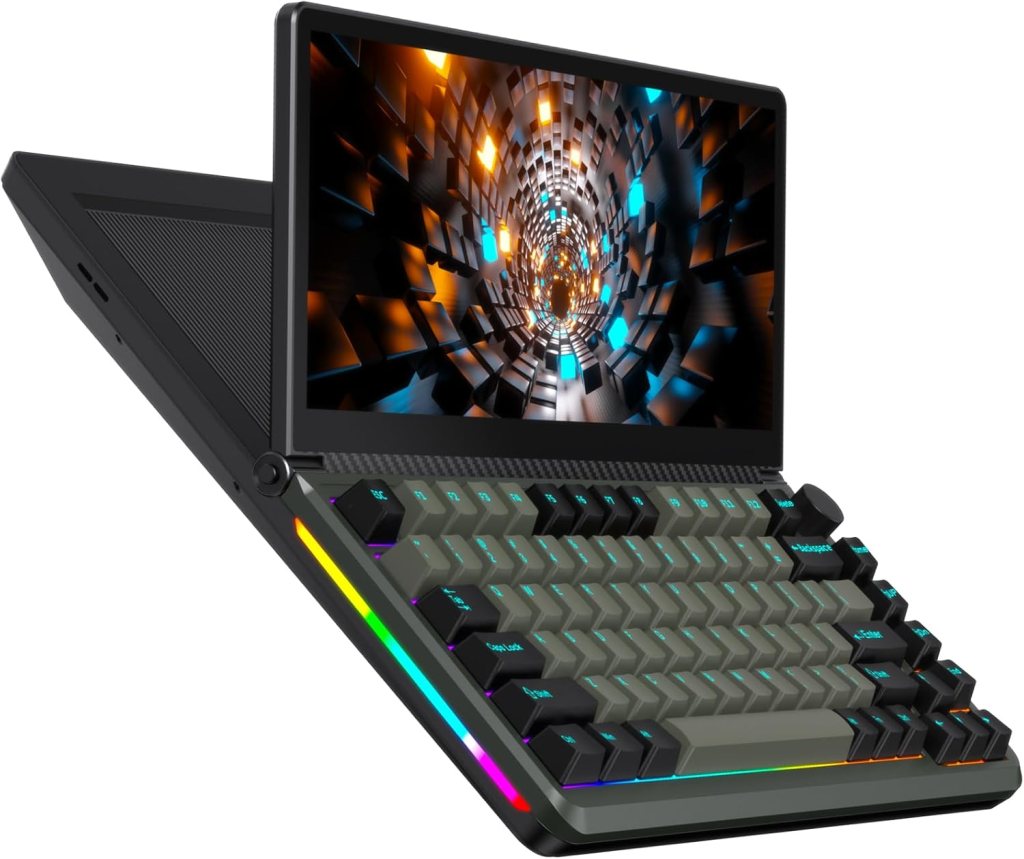
One of the most useful features is the integrated rear shelf. For compact ARM systems this is genuinely practical. A small Raspberry Pi or Compute Module carrier board can sit neatly behind the screen, reducing clutter and creating a semi integrated setup. It pairs particularly well with systems such as the RISCOSbits PiRO Qube or DIY ONE, giving the impression of a modular RISC OS laptop without pretending to be one.
Setting Up
Correct setup under RISC OS depends on using the supplied cable properly.
The included lead is a single three headed cable consisting of HDMI and two USB A connectors merging into a single USB C connector at the device end. All three must be connected. HDMI carries video and audio. The two USB A connectors provide power and USB hub functionality. The USB C plug must go into the fully enabled port on the device.
Using only the power delivery port will not provide full functionality.
Once connected correctly, RISC OS recognises the touchscreen and keyboard as standard USB HID devices without additional drivers. For anyone maintaining headless machines, this makes it an excellent diagnostic console. Plug in HDMI and USB and you immediately have boot visibility and keyboard control.
Display
The 13 inch display runs at 1920 by 720. For RISC OS this resolution works extremely well. The operating system thrives in wide workspaces. Two applications can sit comfortably side by side, or a TaskWindow can remain visible alongside configuration tools without feeling cramped.
Touchscreen support works out of the box. However, RISC OS initially assumes an incorrect pixel shape. Manual adjustment of the eigenvalues is required to correct the aspect ratio. Once configured, the image appears entirely natural.
Audio is passed over HDMI and played through two built in stereo speakers. They are not hi fi and lack bass, but they are perfectly adequate for system sounds, demonstrations and general use. Volume can be controlled via the on screen display.
The OSD itself is unconventional. There are no small front buttons. It is activated either by a two finger drag to the bottom right corner of the screen or by a rear toggle switch. The rear switch is more reliable. Controls include brightness, volume, colour, rotation and reset.
Touch interaction works reasonably well. Using !WinMenu, standard menu behaviour can be mapped. However, submenu navigation is awkward. Attempting to move into a submenu often results in selecting it instead. Select and Menu can be managed, but Adjust emulation remains unresolved.
A leatherette slipcover is supplied, which is sensible given how exposed the screen is in transit.
Keyboard
The keyboard claims ISO layout but does not perfectly match UK RISC OS expectations. For example, there is no pound sign on the 3 key. However, removable keycaps and hot swappable mechanical switches make this less of an issue. Keycaps can be changed and layouts adjusted physically. Combined with KeyMapper, most inconsistencies can be resolved.
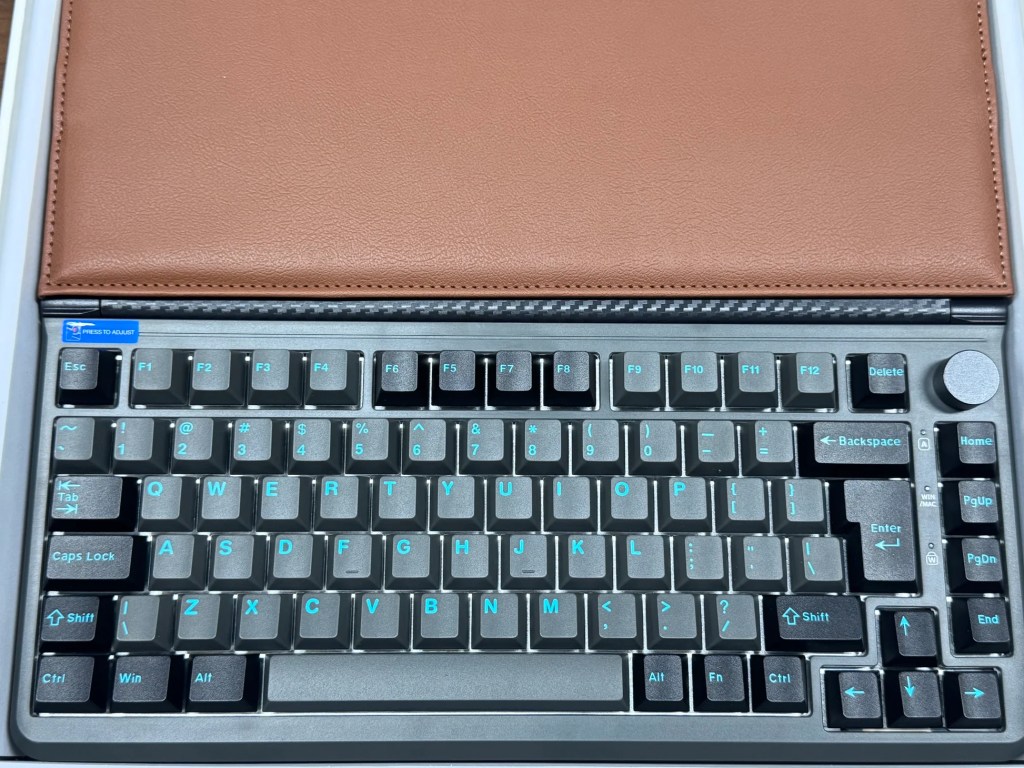
Typing feel is solid and consistent. It is not enthusiast grade, but perfectly suitable for extended use.
The RGB lighting system is extensive. Both the main keyboard and the side light strips can be configured separately. It can be as restrained or as garish as you wish.
One minor omission is the lack of a Break key, though this can be mapped elsewhere.
Connections and Power
Internally the device contains a VIA USB hub providing two USB A ports, an SD card reader and a USB to M.2 SATA bridge. There is also a USB C DisplayPort Alt Mode connector and a separate power delivery USB C port.
The USB ports are useful for attaching a mouse or storage devices. The SD card reader appears to function correctly under RISC OS.
The SATA M.2 interface is recognised at USB level. USBInfo confirms that the bridge chipset is visible. However, attached drives do not appear on the icon bar. This may be resolvable via a quirk, but out of the box it is effectively unusable under RISC OS.
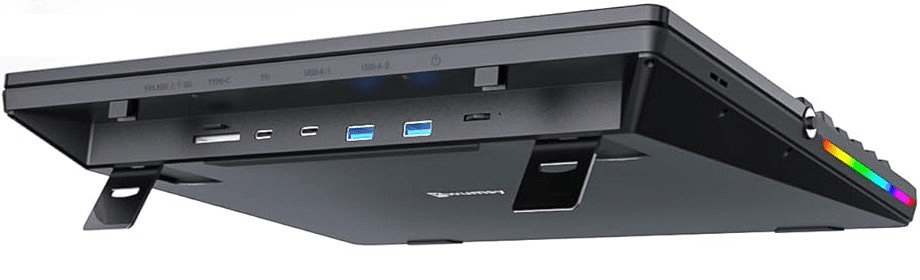
Power is one of its strengths. It can be run from two USB ports on a Raspberry Pi with max_current enabled, allowing the entire setup to use a single power supply. Alternatively, a suitable power bank makes it portable.
The supplied international plug adaptor works but feels cheap. A better quality PSU is advisable, although in many RISC OS setups you may not need it.
A Wider Perspective
Outside the RISC OS world, the K3 is generally regarded as a clever productivity device. Reviewers praise the ultra wide screen, mechanical keyboard and integrated hub design. The concept is seen as innovative and practical for desktop and laptop workflows.
Common criticisms include the weight, the hinge firmness and the lack of an internal battery. Build quality is typically described as good for the price rather than premium.
Customer support experiences appear mixed, which partly explains why it is unlikely to be stocked as an official RISCOSbits product. Longevity and supply stability matter in a niche ecosystem.
Conclusion
For RISC OS users prepared to take a punt, the K3 is surprisingly capable.
It provides immediate touchscreen compatibility, a resolution that suits multitasking, integrated audio, spare USB ports and a tidy single cable setup. The rear shelf makes it particularly attractive when paired with compact systems such as the PiRO Qube or DIY ONE. As a portable rescue console for headless machines, it is genuinely excellent.
There are compromises. The hinge could be firmer. The SATA support is incomplete under RISC OS. Touch navigation is not perfect. The supplied adaptor feels low cost.
It is not luxurious and it is not premium engineered. But it is also not priced as such.
Within a compact RISC OS setup it solves several practical problems in one device. It reduces cable clutter, provides a wide and usable workspace and gives immediate physical access to machines that would otherwise be remote.
For many RISC OS users, that is more than enough. If you want to try to build your own peculiar RISC OS machine, using the K3 keyboard and screen, then you’ll need to go to https://kwumsy.com/products/kwumsy-k3-touch-expanding-screen-keyboard
A more detailed review will hopefully appear in an upcoming issue of Archive Magazine.
 RISCOSbits